
|
|
|||||||
| SageTV v7 Customizations This forums is for discussing and sharing user-created modifications for the SageTV version 7 application created by using the SageTV Studio or through the use of external plugins. Use this forum to discuss plugins for SageTV version 7 and newer. |
 |
|
|
Thread Tools | Search this Thread | Display Modes |
|
#1
 09-19-2010, 09:19 PM
|
||||
|
||||
|
Plugin :: Season / Episode Number
This plugin adds the Season and Episode number, if available, to the display of information about TV shows.
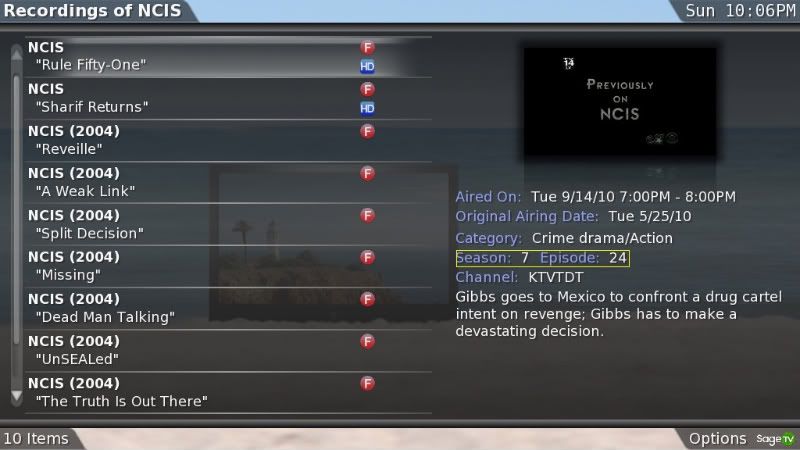 This is best leveraged by configuring BMT to do automatic scraping of TV shows - the Season and Episode number get populated by that process. btl.
__________________
PHOENIX 3 is here! Server : Linux V9, Clients : Win10 and Nvidia Shield Android Miniclient 
|
|
#2
09-19-2010, 09:21 PM
|
||||
|
||||
|
ooooh, off to try this. right. now.

__________________
SageTV Server 7.1.x w/Gemstone and Plex Home Theater v1.0.10 w/PlexPass
HD-PVR w/v1.5.6 drivers / Hauppauge IR blaster / FiOS Extreme HD / Motorola QIP6200 / SPDIF+720p Fixed Output on HP Media Center 8400F (Phenom 9500 QuadCore 2.2GHz, nVidia GeForce 8500 GT) via Olevia 247TFHD/Onyko TX-SR606/Harmony 550/HP MediaSmart EX490 WHS w/12TB Plex Media Server v0.9.9.5 on HP Touchsmart Envy 23 d16qd Sonos Play:3, Connect / SimpleTV v2 / Roku 2 XS+Plex / iPhone 5 / iPad 2
|
|
#3
09-19-2010, 09:37 PM
|
||||
|
||||
|
Balio,
Thanks for the hard work. Your plugin just come out today? I'm already showing (had for months) season and episode like you have pictured. Either I installed your plugin or another plugin I'm really not sure. I'm going to look through my plugins to see if I can find it.
__________________
Server: HP AMD64 dual core running Win7 64bit (MCE disabled) with 4G memory Tuners: 2 PVR-500(disabled), 3 HDHR and 1 HDPVR Clients: 2 HD200 and 1 HD100 TV: 70" and 52" and 42" Media Storage: ReadyNas 8TB Recording media: 300GB + 200GB+ 250 GB Network: Gigabit backbone' Thanks to all the developers who work on SageMC, code, utilities and plug-ins to make SageTV better!!! 
|
|
#4
09-20-2010, 12:36 AM
|
||||
|
||||
|
Yeah, I could have sworn I had seen one that did that before but I couldn't find anything in the repository that did that .....
What I remember vaguely is one that added SXXNXX somewhere - it might have been in malore? btl.
__________________
PHOENIX 3 is here! Server : Linux V9, Clients : Win10 and Nvidia Shield Android Miniclient
|
|
#5
09-20-2010, 02:08 AM
|
|||
|
|||
|
So this great thank you
My only question has any one figured out how to say for a series like TMNT where there is 10 season how to get it to go into a folder secture if u important i as a recodreing. Dont get me wrong this makes this a lot easyer just wondering if i am missing something i know if i keep it in videos and just go to like a folder stucter i can have that but that not what i want. Want tv shows with tv.
|
|
#6
09-20-2010, 06:16 AM
|
||||
|
||||
|
The base STV doesn't have the ability to group by Season number, so you aren't missing anything.
Phoenix will, as well as Ortus (I'm assuming). TVE was able to sort this way also, but I dn't know if it's fully sported on V7.... btl.
__________________
PHOENIX 3 is here! Server : Linux V9, Clients : Win10 and Nvidia Shield Android Miniclient
|
|
#7
09-20-2010, 06:40 AM
|
||||
|
||||
|
Awesome Bialio THANKS!
I too swear that i had at one point Season Episode number showing up, but then it suddenly disappeared. Maybe it had something to do with the Malore menus for me. I installed them at one point and then could have sworn some of the changes carried over to the default stv. I know that sounds weird and it shouldn't happen that way but i know i had em. Anyways thanks so much for this it is GREAT!! ~Pix
|
|
#8
09-20-2010, 08:58 AM
|
|||
|
|||
|
Excellent plugin - I no longer have to guess /hope that I am going to play the right episode; extremely useful. Thank-you.
I'm not sure if it is related to this plugin specifically, but after installing it, the Video and TV menu inversed positions. So, I now have the Video menu up top and the TV menu right below it - this happened after installing the plugin and reloading the UI. I am using the Serenity theme and viewing on the server... anyone else run into something like this?
__________________
Server: SageTV 7 (latest), Windows 7 (32-bit); Core2 Q8200, Asus P5N-D, ATI Sapphire HD5670 with Bitstreaming; DVD/BD Drive, 4GB Ram, 8TB Storage Internal Tuners: Clear QAM Dual Tuner; HD-PVR -- Time Warner Cable / Control STB via Firewire; use USB-UIRT with LM Gestion Remote KeyMap
|
|
#9
09-20-2010, 09:07 AM
|
||||
|
||||
|
I'm using the MBDiamond theme and I haven't seen this happen. Not sure if it's related but someone posted that after adding the Trailers plugin, their main menu order was re-arranged as well...
What clients/extenders are you seeing this on?
__________________
SageTV Server 7.1.x w/Gemstone and Plex Home Theater v1.0.10 w/PlexPass
HD-PVR w/v1.5.6 drivers / Hauppauge IR blaster / FiOS Extreme HD / Motorola QIP6200 / SPDIF+720p Fixed Output on HP Media Center 8400F (Phenom 9500 QuadCore 2.2GHz, nVidia GeForce 8500 GT) via Olevia 247TFHD/Onyko TX-SR606/Harmony 550/HP MediaSmart EX490 WHS w/12TB Plex Media Server v0.9.9.5 on HP Touchsmart Envy 23 d16qd Sonos Play:3, Connect / SimpleTV v2 / Roku 2 XS+Plex / iPhone 5 / iPad 2
|
|
#10
09-20-2010, 09:17 AM
|
|||
|
|||
|
I think the problem has to do with the SMM menu. I disabled the SMM plugin and the TV and Video menus were back to their default positions after reloading the UI. What's interesting is that if I enable the SMM plugin again, the TV and Video menu will once again switch positions after reloading the UI. I am viewing this on my main Server.
__________________
Server: SageTV 7 (latest), Windows 7 (32-bit); Core2 Q8200, Asus P5N-D, ATI Sapphire HD5670 with Bitstreaming; DVD/BD Drive, 4GB Ram, 8TB Storage Internal Tuners: Clear QAM Dual Tuner; HD-PVR -- Time Warner Cable / Control STB via Firewire; use USB-UIRT with LM Gestion Remote KeyMap
|
|
#11
09-20-2010, 09:18 AM
|
||||
|
||||
|
Plucky likes to play with peoples minds - so I'm sure this is an intentional side effect of SMM
 btl.
__________________
PHOENIX 3 is here! Server : Linux V9, Clients : Win10 and Nvidia Shield Android Miniclient
|
|
#12
09-20-2010, 09:30 AM
|
|||
|
|||
|
Quote:
 I answered your question in the SMM thread, but really there is nothing I or Bailo can do without dynamic menu's. More than one plugin modifying the main menu will cause issues if we are both modifying the same area differently. So you have to live with the "issue" or problem or decide which plugins you want to use. There are multiple plugins that modify the main menu and running more than one sometimes causing ill side effects.
|
|
#13
09-20-2010, 09:31 AM
|
|||
|
|||
|
Ha - That would also explain my case of the ghost covers that are sometimes there and somehow vanish when I'm showing off the system
I did log an issue within the SMM forum here. Must of been typing at the same time (or I am really slow at responding). Thanks for looking into this. Yet another reason to look forward to dynamic customizable menus. Thanks!
__________________
Server: SageTV 7 (latest), Windows 7 (32-bit); Core2 Q8200, Asus P5N-D, ATI Sapphire HD5670 with Bitstreaming; DVD/BD Drive, 4GB Ram, 8TB Storage Internal Tuners: Clear QAM Dual Tuner; HD-PVR -- Time Warner Cable / Control STB via Firewire; use USB-UIRT with LM Gestion Remote KeyMap
|
|
#14
09-20-2010, 09:33 AM
|
||||
|
||||
|
This plugin doesn't mess with the main menu - although if you have MyTV installed it DOES.
btl.
__________________
PHOENIX 3 is here! Server : Linux V9, Clients : Win10 and Nvidia Shield Android Miniclient
|
|
#15
09-20-2010, 09:38 AM
|
|||
|
|||
|
Yes, I do have "My TV" plugin installed. I do now understand the issue with modifying the main menu; very interesting. Thanks so much for all the responses.
__________________
Server: SageTV 7 (latest), Windows 7 (32-bit); Core2 Q8200, Asus P5N-D, ATI Sapphire HD5670 with Bitstreaming; DVD/BD Drive, 4GB Ram, 8TB Storage Internal Tuners: Clear QAM Dual Tuner; HD-PVR -- Time Warner Cable / Control STB via Firewire; use USB-UIRT with LM Gestion Remote KeyMap
|
|
#16
09-20-2010, 09:44 AM
|
|||
|
|||
|
Quote:

|
|
#17
09-20-2010, 09:46 AM
|
||||
|
||||
|
I'm almost done with my 'STV Defender' plugin that finds all of plucky's mods and replaces them with Dancing Unicorns. Look for it soon in the plugin repository.
__________________
PHOENIX 3 is here! Server : Linux V9, Clients : Win10 and Nvidia Shield Android Miniclient
|
|
#18
09-20-2010, 10:52 AM
|
||||
|
||||
|
Quote:
__________________
Server: XP, SuperMicro X9SAE-V, i7 3770T, Thermalright Archon SB-E, 32GB Corsair DDR3, 2 x IBM M1015, Corsair HX1000W PSU, CoolerMaster CM Storm Stryker case Storage: 2 x Addonics 5-in-3 3.5" bays, 1 x Addonics 4-in-1 2.5" bay, 24TB Client: Windows 7 64-bit, Foxconn G9657MA-8EKRS2H, Core2Duo E6600, Zalman CNPS7500, 2GB Corsair, 320GB, HIS ATI 4650, Antec Fusion Tuners: 2 x HD-PVR (HTTP tuning), 2 x HDHR, USB-UIRT Software: SageTV 7
|
|
#19
09-20-2010, 02:51 PM
|
|||
|
|||
|
Quote:
|
|
| Currently Active Users Viewing This Thread: 1 (0 members and 1 guests) | |
|
|
 Similar Threads
|
||||
| Thread | Thread Starter | Forum | Replies | Last Post |
| [PLUGIN] Season-Episode for Malore Recordings. | Fuzzy | SageTV v7 Customizations | 4 | 02-05-2011 05:25 AM |
| Season/Episode number display | soulprops77 | SageTV v7 Customizations | 2 | 08-17-2010 03:40 PM |
| Season/Episode in filename | svalmorri | SageMC Custom Interface | 6 | 09-24-2009 09:42 PM |
| add Season and Episode numbers | LoopyWolf | SageTV Customizations | 2 | 09-12-2009 01:41 PM |
| Season and episode information? | CadErik | SageTV EPG Service | 7 | 10-03-2006 03:06 PM |






 Linear Mode

